Table of Contents
npm install as-simdI'll write them soon. Usage is exactly the same as existing SIMD api though.
Use as-simd directly as a transform.
CLI:
npx asc assembly/index.ts --transform as-simd/transformProgrammatic asc.main():
await asc.main([
  "assembly/index.ts",
  "--transform",
  "as-simd/transform",
]);
If a tool expects a direct source entrypoint, use as-simd/sources.
To opt into real SIMD codegen, explicitly enable SIMD:
npx asc assembly/index.ts --transform as-simd/transform --enable simdWithout explicit SIMD opt-in, as-simd runs in strict SWAR mode. v128-family globals (v128, i8x16, i16x8, i32x4, i64x2) will fail with a clear diagnostic.
For IntelliSense on global aliases, include:
{
  "include": ["./node_modules/as-simd/globals.d.ts"]
}import { i8x8 } from "as-simd";
const a = i8x8(1, 2, 3, 4, 5, 6, 7, 8);
const b = i8x8(8, 7, 6, 5, 4, 3, 2, 1);
const sum = i8x8.add(a, b);
const product = i8x8.mul(a, b);
const sat = i8x8.add_sat_s(a, b);
const lane3 = i8x8.extract_lane_s(sum, 3);import { i8x8 } from "as-simd";
let x = i8x8.splat(5); // [5,5,5,5,5,5,5,5]
x = i8x8.replace_lane(x, 2, -7); // [5,5,-7,5,5,5,5,5]
const v = i8x8.extract_lane_s(x, 2); // -7import { i8x8 } from "as-simd";
const a = i8x8(10, -2, 30, -40, 50, -60, 70, -80);
const b = i8x8(1, 2, 3, 4, 5, 6, 7, 8);
const sub = i8x8.sub(a, b);
const mul = i8x8.mul(a, b);
const lt = i8x8.lt_s(a, b); // lane masks: 0x00 or 0xFF per lane
const laneMask = i8x8.bitmask_lane(lt); // 0x80 in each truthy lane
// Existing bitmask() returns packed lane bits. ctz(mask) << 3 gives
// the byte shift for the first truthy lane.
const firstByteShift = ctz(i8x8.bitmask(lt)) << 3;
// bitmask_lane() returns a vector-shaped mask. ctz(mask) >> 3 gives
// the first truthy lane index.
const firstLane = ctz(laneMask) >> 3;import { i8x8 } from "as-simd";
const hi = i8x8(120, 120, -120, -120, 100, -100, 127, -128);
const lo = i8x8(20, 40, -20, -40, 50, -50, 1, -1);
const satAdd = i8x8.add_sat_s(hi, lo);
const satSubU = i8x8.sub_sat_u(hi, lo);
// narrow from packed i16 lanes in two v64 values -> one i8x8
const narrowed = i8x8.narrow_i16x4_s(0x0001000200030004, 0xfff0fff1fff2fff3);import { i8x8 } from "as-simd";
const a = i8x8(0, 1, 2, 3, 4, 5, 6, 7);
const b = i8x8(10, 11, 12, 13, 14, 15, 16, 17);
const mixed = i8x8.shuffle(a, b, 0, 1, 8, 9, 2, 10, 3, 11);
const indexed = i8x8.swizzle(a, i8x8(7, 6, 5, 4, 3, 2, 1, 0));as-simd focuses on lane-parallel i8x8 behavior with multiple implementations:
- scalar mirror (
assembly/scalar/i8x8.ts) for correctness oracle behavior - SWAR implementation (
assembly/v64/i8x8.ts) for baseline portability - SIMD-enabled code paths (compile-time gated by
ASC_FEATURE_SIMD) where profitable
Correctness is validated by:
- deterministic unit parity tests against scalar
- mode-specific fuzz parity in SWAR and SIMD builds
All charts and benchmark results are located Here
Here's some results comparing i16x4 (SWAR) versus the native i16x8 (SIMD) implementation.
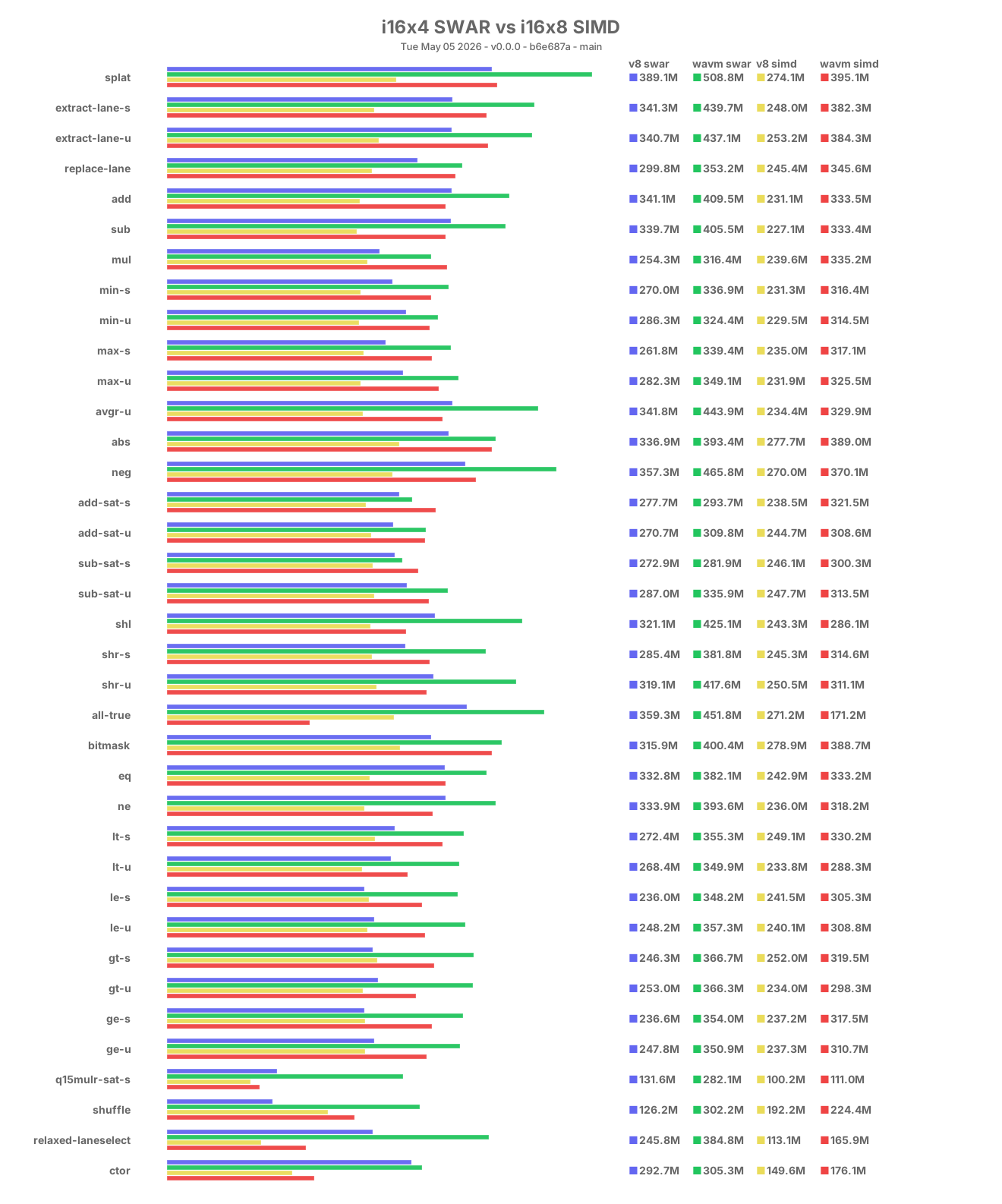
Benchmarks are run directly on top of v8 for tighter control over the engine configuration.
- Install the local benchmark prerequisites:
npm install -g jsvu
jsvu --engines=v8- Add
~/.jsvu/binto yourPATHand make surewasm-optis installed:
export PATH="${HOME}/.jsvu/bin:${PATH}"
sudo apt-get install -y binaryen- Install project dependencies:
npm install- Run benchmarks:
npm run benchRun modes separately:
npm run bench:swar
npm run bench:simd
Run both sequentially:
npm run bench:splitFocused split benchmark (single dispatcher benchmark with mode-based branch):
npm run bench:swar:i32x4
npm run bench:simd:i32x4- Build charts:
npm run chartsContributions are welcome. For changes to core vector behavior:
- keep scalar and vector implementations behaviorally aligned
- update or add deterministic tests in
assembly/__tests__ - update or add fuzz checks in
assembly/__fuzz__ - run
npm testand both fuzz modes before opening a PR
Prefer narrowly scoped commits with Conventional Commit messages.
This project is distributed under an open source license. Work on this project is done by passion, but if you want to support it financially, you can do so by making a donation to the project's GitHub Sponsors page.
You can view the full license using the following link: License
Please send all issues to GitHub Issues and to converse, please send me an email at me@jairus.dev
- Email: Send me inquiries, questions, or requests at me@jairus.dev
- GitHub: Visit the official GitHub repository Here
- Website: Visit my official website at jairus.dev
- Discord: Contact me at My Discord or on the AssemblyScript Discord Server